A novel can be clear in your head and a mess in your notes. One scene sits in a file. A clue lives on a scrap of paper. You know a character should return, but you cannot see where they last appeared.
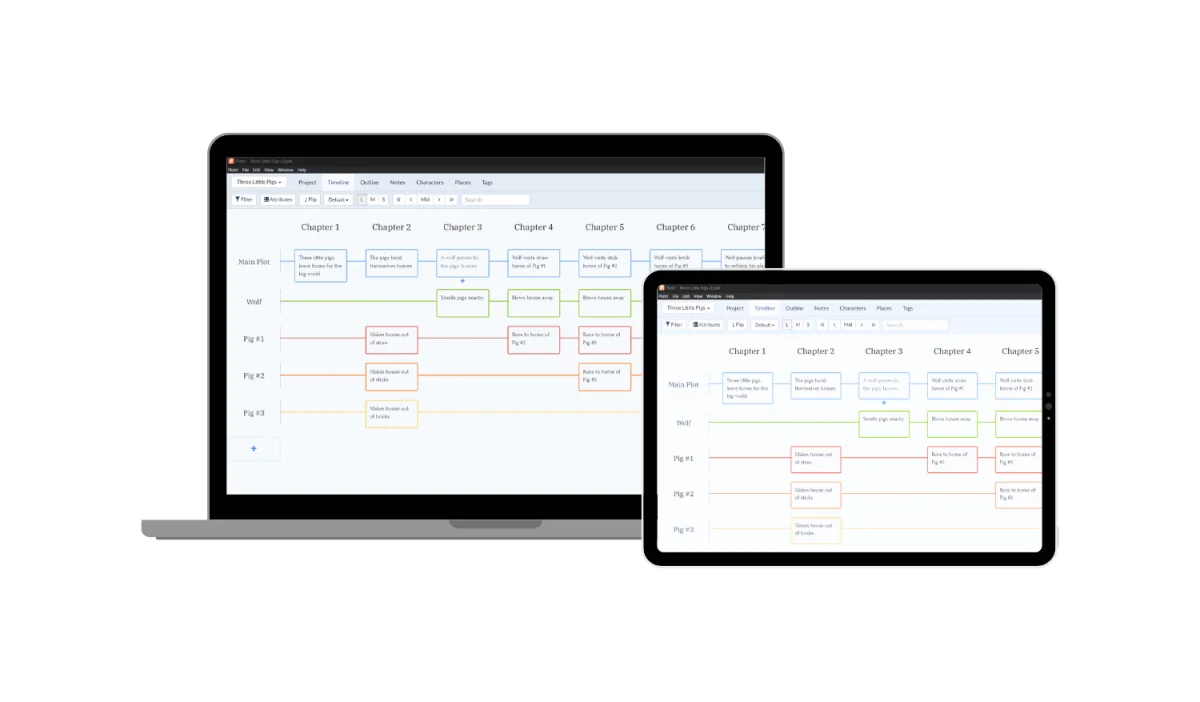
Plottr is built for that mess. It turns a book plan into a visual timeline, with scene cards, plot lines, and notes you can move around. You still write the draft in a separate writing app.
I would choose Plottr when the shape of a story is the hard part. I would skip it when the real problem is sitting down to write. Another tool can help you see the work. It cannot do the work for you.
Plottr review: the quick verdict
| Your writing style | My view |
|---|---|
| You plan scenes before drafting. | A strong fit. The timeline makes it easy to see order and gaps. |
| You write a series with many characters. | Worth a trial for shared story notes and series planning. |
| You find the plot while writing. | Try mapping a finished draft. Do not force a full outline first. |
| You want one app to draft and publish a book. | Wrong fit. Plottr focuses on planning. |
The visual timeline is the main reason to buy
Think of the Plottr timeline as a digital corkboard. Chapters or story beats run across one axis. Your main plot and subplots run along the other. Place scene cards at the points where those lines meet.
This visual layout gives a scene a place in the whole book. You can drag a card to a new spot, use colors for different threads, and filter the view. You can also flip the timeline to suit the way you like to read a plan.
Imagine a mystery with three plot lines: the crime, a strained friendship, and a missing witness. Halfway through the novel, the witness vanishes from the plan for six chapters. On a long page of notes, that gap may be easy to miss. On a timeline, the empty stretch gives you a reason to look closer.
The gap is not proof of a plot hole. A quiet subplot may be deliberate. Plottr gives you a view that makes the question easier to ask.
That distinction matters. Plotting software can arrange ideas and help you track them. It does not know whether a twist is fair, a scene is dull, or a character's choice makes sense.
Keep scene cards short enough to use
I would begin each card with one event, one goal, and one change. For example: “Nora asks about the key. She wants a name. She leaves with a false address.” That is enough to place the scene without writing it twice.
Plottr supports details such as characters, places, tags, and custom attributes. An attribute is a field you define. You might add point of view, date, or the clue a scene reveals.
For multiple points of view, use the same field on each card. Then filter by a character to see their part of the story. Consistent fields do more for a plan than a large set of half-filled notes.
Do not build a field for every thought. If you never use a detail to make a writing decision, it may belong in a plain note. A scene card should help you start the next scene, not become a form you dread filling in.
Story templates help when you need a starting point
Plottr includes plot templates based on familiar story structures. Its feature guide lists the Hero's Journey, Three Act Structure, and other approaches, along with character and scene templates.
A template can be useful when you have a beginning and an end but no clear middle. It gives you prompts for the kinds of turns a story may need. You can change the outline to fit your own plotlines.
I would treat each beat as a question. What changes here? Why does the next scene follow? What will the reader expect now? If a template's answer does not fit the book, change it.
That is a better use of story structure than trying to fit every novel into the same mold. A short mystery and a large fantasy series may need quite different plans.
Character templates deserve the same restraint. A full life history can be fun to create. But the detail that matters most may be much smaller: what does this person want in the next scene, and what keeps them from getting it?
A useful home for characters and places
Plottr can keep character profiles, places, notes, and images with the book plan. Tags and custom attributes help you sort those details. For a series, you can keep multiple books in one project and use a series view.
That gives a series bible a clear job. It holds facts you do not want to change by mistake. A street name. A family link. The rule for how a made-up world works.
I would separate fixed facts from open ideas. “The bridge fell ten years ago” is a fact in the story. “Could the bridge hide a clue?” is an idea. Clear notes keep a stray thought from turning into false history in book three.
Writers of sci-fi and fantasy may find this especially helpful. Yet the same need can arise in a small-town series with no invented worlds at all. The value comes from the number of details you must keep straight.
Plottr exports an outline, not a finished manuscript
Plottr can export planning material to Microsoft Word and Scrivener. Its export instructions explain how to move the outline and related notes into those tools.
I would test that step early. Make a tiny project with three scenes, one character, and one place. Export it. Open the result in the app where you plan to write. Check which notes arrive and how the order looks.
Do this before adding a whole novel. A workflow can feel good inside one program and become awkward at the handoff.
Do not assume that later edits in your draft flow back into the Plottr timeline. Export is a handoff, not a promise of live two-way sync with your writing software. Decide which file holds the current plan and which holds the current draft.
When the book is ready for its own website, our Bricks Builder review covers the next kind of structure: a WordPress site with pages you can update without rebuilding each one.
Plottr pricing and the cost of Pro
Plottr has several pricing options. These US dollar prices were listed on September 25, 2026. Check the total and plan terms before you pay.
| Plan | Listed price |
|---|---|
| Plottr annual | $60 per year. |
| Plottr lifetime | $150 once. |
| Plottr Pro monthly | $9.99 per month. |
| Plottr Pro annual | $99 per year. |
| Plottr Pro lifetime | $599 once. |
Standard Plottr stores files locally. Plottr Pro adds cloud storage, sync across devices, a web app, and live collaboration. Each person who joins a live collaboration needs their own Pro plan.
The standard lifetime price equals two and a half years at the current annual price. That may be good value if the tool becomes part of your writing process. It is not a reason to buy before you know that it fits.
The difference when a plan ends is more important. Standard Plottr can still be used after its annual plan lapses, but without new updates. For Pro, the company says you lose access to projects when the plan ends. Export what you need before cancellation takes effect.
There is a 30-day free trial. Purchases are nonrefundable under the current Plottr pricing and purchase terms. I would use the trial to test a real section of a book, including backup and export. Do not treat it as a month to browse templates.
What other writers find useful
Reader reports give a mixed, useful picture. In a 2023 discussion on Reddit's writing forum, a writer using the name kleiokat said the visual plan and scene templates helped them make progress. Daisyelise found the timeline useful for checking scene titles while drafting elsewhere.
Other comments in that thread questioned paying for planning features their existing software could already cover. One account described file problems after a move to Pro. That is an individual report about an older version, not proof that the same fault affects today's app.
The practical lesson is to test your own file path. Save, close, reopen, back up, and export. If you want cloud sync, check it on the devices you will use. A neat timeline is less useful if you do not trust where your notes are saved.
A small trial that tells you more than a feature list
I would give Plottr one clear job during the free trial: make the next five scenes easier to write. Add those scenes to a timeline. Include only the characters and places they need.
Move a scene, filter one plot line, and export the outline. Then write a scene in your usual app. Did the plan remove a choice that was slowing you down? Could you find the detail you needed without breaking your focus?
If the answer is yes, add more of the book. If you spent all the time choosing colors, shrink the plan. If you still prefer sticky notes, that is useful to know before you buy.
The learning curve is easier to judge with a small project. Video tutorials can help with a specific task, but you do not need to watch a full course before placing three cards.
For the habit of returning to a draft, see our guide to productivity books. A clear plan and a regular writing slot solve different problems. Most writers need some form of both.
My final verdict: a strong planner with a clear boundary
Plottr is a good fit for visual planners, series authors, and writers who need to keep several storylines in view. The timeline, scene cards, and shared story notes have a clear purpose.
I would start with standard Plottr for solo work on a computer. I would pay for Plottr Pro only if cloud access or live collaboration solves a real need. Neither plan replaces a place to write the manuscript.
The test is simple: does Plottr help you finish scenes? If it does, the plan is earning its place. If it only gives you a more attractive way to delay the draft, close the timeline and write the next page.